Website | Free download but no source?
The most widespread instance of Isabelle nowadays is Isabelle/HOL, which provides a higher-order logic theorem proving environment that is ready to use for big applications.
Isabelle/HOL includes powerful specification tools, e.g. for (co)datatypes, (co)inductive definitions and recursive functions with complex pattern matching.
Proofs are conducted in the structured proof language Isar, allowing for proof text naturally understandable for both humans and computers.
For proofs, Isabelle incorporates some tools to improve the user's productivity. In particular, Isabelle's classical reasoner can perform long chains of reasoning steps to prove formulas. The simplifier can reason with and about equations. Linear arithmetic facts are proved automatically, various algebraic decision procedures are provided. External first-order provers can be invoked through sledgehammer.
Abstract specifications are supported by a module system (known as locales), of which type classes are a special case.
Isabelle provides excellent notational support: new notations can be introduced, using normal mathematical symbols. Definitions and proofs may include LaTeX source, from which Isabelle can automatically generate typeset documents (papers, books, theses).
Isabelle/HOL allows to turn executable specifications directly into code in SML, OCaml, Haskell, and Scala.
Isabelle comes with a large theory library of formally verified mathematics, including elementary number theory (for example, Gauss's law of quadratic reciprocity), analysis (basic properties of limits, derivatives and integrals), algebra (up to Sylow's theorem) and set theory (the relative consistency of the Axiom of Choice). Also provided are numerous examples arising from research into formal verification. A vast collection of applications is accessible via the Archive of Formal Proofs, stemming both from mathematics and software engineering.
Isabelle/jEdit is the default user interface and Prover IDE for Isabelle. It is based on jEdit and Isabelle/Scala. It provides a metaphor of continuous proof checking of a versioned collection of theory sources, with instantaneous feedback in real-time and rich semantic markup for the formal text.
Isabelle may serve as a generic framework for rapid prototyping of deductive systems. These are formulated within Isabelle's logical framework Isabelle/Pure, which is suitable for a variety of formal calculi (e.g. axiomatic set theory). Instantiating the generic infrastructure to a particular calculus usually requires only minimal setup in the Isabelle implementation language ML. One may also write arbitrary proof procedures or even theory extension packages in ML, without breaking system soundness (Isabelle follows the well-known LCF system approach to achieve a secure system).
The Docker image contains Ubuntu Linux 22.04 with Isabelle2025. It can be used, e.g. on another Linux host like this:
docker pull makarius/isabelle:Isabelle2025
docker run makarius/isabelle:Isabelle2025
That provides command-line access to the regular isabelle tool wrapper, with indirection through the Docker container infrastructure.
The default platform is Intel x86_64, but ARM is supported as well (e.g. for Apple M1):
docker pull makarius/isabelle:Isabelle2025_ARM
docker run makarius/isabelle:Isabelle2025_ARM
The bundled archive contains everything required for Isabelle on Linux. It can be unpacked into an arbitrary directory like this:
The Isabelle/jEdit Prover IDE can be invoked like this:
Other Isabelle command-line tools can be invoked from the terminal like this:
The self-extracting archive contains everything required for Isabelle on Windows PCs. It can be unpacked into an arbitrary directory. The installer starts the Isabelle/jEdit Prover IDE automatically for the first time. It also creates a desktop alias to the main executable for later use.
Isabelle2025\Cygwin-Terminal allows to run Isabelle command-line tools, as known from Unix.
Isabelle2025\Cygwin-Setup allows to modify the Cygwin installation of Isabelle, e.g. to add further packages manually.
Note: The Isabelle application lacks developer signatures and certificates, so Microsoft rejects it by default. Running it for the first time requires some careful clicks in the proper spots.
Note: The Windows 10 Defender may prevent external provers from working properly (e.g. for sledgehammer or the smt proof method). In that case the whole Isabelle application directory should be excluded from Virus & threat protection.
The bundled archive contains everything required for Isabelle on Macintosh computers. The Isabelle application can be placed into the /Applications folder and started as usual.
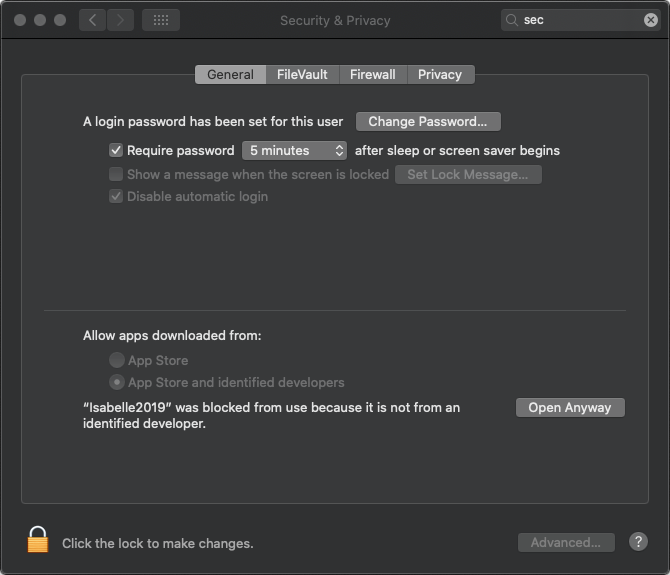
Note: The Isabelle application lacks developer signatures and certificates, so Apple rejects it by default. See also the document Safely open apps on your Mac, notably the last section "How to open an app that hasn’t been notarized or is from an unidentified developer". In short, it should work with the default security settings as follows:
Isabelle2025.app and Cancel the subsequent security dialog.Last modified 15 June 2026